Sunday, January 23, 2011

Wednesday, January 12, 2011
รับเขียน iphone ipad
รับเขียน iPhone Application
รับเขียน iPad Application
รับเขียน Android Application
ติดต่อ anop72 [at] gmail.com
รับเขียน iPad Application
รับเขียน Android Application
ติดต่อ anop72 [at] gmail.com
Tuesday, January 11, 2011
Facebook Fan Page เจอมาน่าสนใจ
ต้องยอมรับว่าทุกวันนี้ คนที่อยู่ในวงการ IT ย่อมรู้จัก Facebook มันเป็นเครือข่ายสังคมออนไลน์ตัวแม่ตัวหนึ่งที่ได้รับความนิยมมาก และเช่นเคยประเทศไทยก็เพิ่งเริ่มดังเริ่มบูมจริงๆได้ไม่นาน มีตัวเลขมาให้ดูเล่นๆ เป็นข้อมูลเมื่อวันที่ 1 July 2010
[*figures are taken from Facebook and then compared to Facebook usage statistics lists that I have previously compiled (allowing the 12 month and 24 month comparisons.)] credits: http://www.nickburcher.com/2010/07/facebook-usage-statistics-by-country.html


| Country | Number of Facebook users 1st July 2008 | Number of Facebook users 1st July 2009 | Number of Facebook users 1st July 2010 | 12 month growth % | 24 month growth % |
| USA | 27,811,560 | 69,378,980 | 125,881,220 | 81.4% | 352.6% |
| UK | 11,171,540 | 18,711,160 | 26,543,600 | 41.9% | 137.6% |
| Indonesia | 209,760 | 6,496,960 | 25,912,960 | 298.9% | 12253.6% |
| Turkey | 3,464,640 | 12,382,320 | 22,552,540 | 82.1% | 550.9% |
| France | 2,461,140 | 10,781,480 | 18,942,220 | 75.7% | 669.7% |
| Italy | 491,100 | 10,218,400 | 16,647,260 | 62.9% | 3289.8% |
| Canada | 9,621,820 | 11,961,020 | 15,497,900 | 29.6% | 61.1% |
| Philippines | 162,640 | 2,719,560 | 14,600,300 | 436.8% | 8877.1% |
| Mexico | 1,042,820 | 3,644,400 | 12,978,440 | 256.1% | 1144.6% |
| Spain | 695,900 | 5,773,200 | 10,610,080 | 83.8% | 1424.7% |
| India | 711,520 | 3,236,140 | 10,547,240 | 225.9% | 1382.4% |
| Argentina | 417,980 | 4,906,220 | 10,542,040 | 114.9% | 2422.1% |
| Colombia | 2,412,000 | 5,760,300 | 10,226,820 | 77.5% | 324% |
| Thailand | 114,180 | 697,340 | 4,216,760 | 504.7% | 3593.1% |
| Sweden | 1,141,700 | 2,287,240 | 3,798,020 | 66.1% | 232.7% |
[*figures are taken from Facebook and then compared to Facebook usage statistics lists that I have previously compiled (allowing the 12 month and 24 month comparisons.)] credits: http://www.nickburcher.com/2010/07/facebook-usage-statistics-by-country.html
ดูตัวเลขแล้วเห็นได้ชัดว่าไทยแลนด์แดนเมืองยิ้มเพิ่งหันมาเล่น Facebook กัน ส่วนประเทศอื่นไปไหนต่อไหนแล้ว... กลับมาเรื่องของเราต่อดีกว่า พูดถึง Facebook fan page มันเป็นหน้าสำหรับกลุ่มย่อยๆ ของคนที่ชอบในสิ่งเดียวกัน จึงมีการนำไปใช้ในงานสื่อ, โฆษณาและการตลาด แต่การสร้างให้น่าสนใจก็ไม่ง่ายครับ แต่ก็ไม่ยากจนเกินไป
อย่างกับหน้าของเกม Assassin's Creed เวลามีอีเวนต์ก็จะสร้างแท็บขึ้นมา เพื่อดึงดูดคนให้เข้ามากด Like และสามารถติดตามข่าวสารหรือสิ่งใหม่ๆจากเกมนี้ได้ตลอดเวลา เค้าทำหน้าเบลอๆเอาไว้ให้สงสัยเล่นๆ ต้องกด Like เท่านั้นถึงจะโชว์คอนเทนต์ออกมา ซึ่งก็ทำให้ผมต้องกดเพื่อดูว่ามันคืออะไรกันแน่ ลองดูภาพ...


ก็เป็นแบบหนึ่งที่นำมาแบ่งปัน ลองดูครับว่า Facebook สามารถทำอะไรได้หลายอย่างหากเลือกที่จะใช้มัน...
Monday, December 27, 2010
ประสบการณ์จาก admob
Admob เป็นคนกลางเพื่อบริการเกี่ยวกับโฆษณา ตอนนี้โดน google งาบไปเรียบร้อยแล้ว เจ้าตัว admob อนุญาติให้ผู้มีคอนเทนต์หรือผลิตภัณฑ์ได้มาลงโฆษณา โดยจะต่างก็ตรงที่เน้นบนมือถือครับ จำไม่ได้ว่าผมอ่านเจอ admob จากทวิตเตอร์ของใคร เลยหาข้อมูลเข้ามาอ่านดูศึกษาและพบว่ามี sdk สำหรับ developer ด้วย และมี document ซะเรียบร้อย เลยลองเอามาใช้กับโปรเจคที่กำลังปั่นและปล่อยลง android market ทันที ขณะที่ผมเขียนบล๊อกนี่ก็ครบหนึ่งเดือนพอดีสำหรับ app ที่ปล่อยออกไป ก็แชร์ประสบการณ์กันครับว่าได้อะไรบ้าง
ตอนผมปล่อยเวอร์ชั่นแรกออกไป ผมแปะ ads ไปแค่หน้าเดียวของแอพ วิธีนี้ไม่ได้ผลครับ มีคนคลิกน้อยมาก นับแล้วก็ 6 วันได้ 7 คลิก ได้เงิน 0.62$
จากนั้นลองเพิ่ม ads ในหลายๆจุดแต่ไม่ได้เพิ่มมั่วนะ เลือกหน้าที่ควรวางและตำแหน่งที่เหมาะสม และเขียนโปรแกรมให้ refresh ads ขึ้นมาใหม่ทุกๆ 30-50 วินาที ผลลัพธ์ที่ได้ค่อนข้างน่าพอใจครับ ลองดูกราฟ โดยแกน x เป็นเวลา แกน y เป็นรายได้ที่ได้รับ ขอปิดไว้นิดนึง :P

ก็สรุปว่าถ้าแอพเราดี แอพเราเจ๋ง ปล่อยฟรีก็หาตังได้ครับ...
ตอนผมปล่อยเวอร์ชั่นแรกออกไป ผมแปะ ads ไปแค่หน้าเดียวของแอพ วิธีนี้ไม่ได้ผลครับ มีคนคลิกน้อยมาก นับแล้วก็ 6 วันได้ 7 คลิก ได้เงิน 0.62$
จากนั้นลองเพิ่ม ads ในหลายๆจุดแต่ไม่ได้เพิ่มมั่วนะ เลือกหน้าที่ควรวางและตำแหน่งที่เหมาะสม และเขียนโปรแกรมให้ refresh ads ขึ้นมาใหม่ทุกๆ 30-50 วินาที ผลลัพธ์ที่ได้ค่อนข้างน่าพอใจครับ ลองดูกราฟ โดยแกน x เป็นเวลา แกน y เป็นรายได้ที่ได้รับ ขอปิดไว้นิดนึง :P

ก็สรุปว่าถ้าแอพเราดี แอพเราเจ๋ง ปล่อยฟรีก็หาตังได้ครับ...
Sunday, November 21, 2010
Google realtime กับละคร 365 วันแห่งรัก
ช่วงนี้ติดละครงอมแงม ทุกวันพุธ-พฤหัสต้องเฝ้าละครหลังข่าว สดๆร้อนๆอาทิตย์ที่ผ่านมานี้เอง เรื่องนี้ส่วนตัวผมว่าเนื้อเรื่องง่ายดี แต่ก็โดนใจ เหมือนการตลาดเข้าใจ insight ของผู้บริโภค ที่แน่ๆโดน insight ผมคนนึงล่ะ ดูไปดูมามีฉากนึงคู่พระนางต้องไปฮันนีมูนที่ต่างจังหวัด ซึ่งบรรยากาศดีมาก ดูไปทีแรกก็ยังสงสัยว่าที่นี้มันที่ไหนกัน เริ่มชักอยากจะรู้แล้วสิ สักพักคู่พระนางนั่งรถกอล์ฟชิวกัน กล้องแพนไปหน้ารถกอล์ฟซึ่งมีชื่อสถานที่อยู่ ป๊าป.... มันคือ 'swiss valley' ทันใดนั้นผมเองก็ search และเข้าไปดู ปรากฎว่าหน้าเว็บหน่วงมากอาจเป็นเพราะ flash หรือ traffic ขณะนั้น ผมเองก็ยังเฉยๆ สักพักก็นั่งดู twitter มีคนพูดถึงเยอะมากในช่วงเวลานั้น เลยลองไปดูใน google realtime รูปด้านล่างคือผลลัพธ์ที่ได้ขณะละครยังไม่จบ


ผมเข้าไปดู google realtime และ search keyword คำว่า swiss valley ซึ่งส่วนตัวยังไม่เคยใช้ google realtime เลย รู้สึกว่า amazing มาก ผลลัพธ์บอกได้ชัดเจนว่าละครเรื่อง 365 วันแห่งรักเรตติ้งดีมากครับ ซึ่งผลลัพธ์นั้นจะไปดึง content มาจาก twitter ซึ่งปกติเอง twitter ก็เหมือนจะ realtime อยู่แล้ว google เลยใช้ข้อมูลตรงนี้มาแสดงผล realtime อีกทีนึงเช่นกัน ซึ่งก็เป็นอีก feature หนึ่งที่น่าลองนะครับ
หลังจากละครจบสิ่งที่รู้ในคืนนั้น swiss valley คงทำให้ทุกคนรู้จักไม่มากก็น้อยแหละคราวนี้
Tuesday, November 2, 2010
Integrate twitter with rails
คราวนี้เป็นการเชื่อมต่อ twitter กับ rails โดยจุดประสงค์คือต้องการจะ authenticate เว็บด้วย twitter account โดยใช้มาตรฐาน OAuth ที่ twitter require สำหรับขั้นตอนนั้น ต้องมีการสร้าง app ใน twiiter เป็นเหมือนตัวแทนสำหรับเว็บที่เราจะนำมา authenticate โดยสร้างจากหน้าเว็บ oauth_clients
จะมีปัญหาอยู่อย่างนึงในการสร้าง app คือ หาก app rails เราเป็น browser เราต้องใส่ callback url ลงไป ในสภาพแวดล้อมที่เราพัฒนานั้น ปกติเราใช้ localhost แต่ตัว twitter จะไม่ยอมให้เราใช้ เพราะห่วงเรื่องความปลอดภัย วิธีแก้คือให้ใส่เป็น 127.0.0.1 แทน วิธีแก้อ่านต่อได้จาก How to quick set up a test for Twitter OAuth
จะมีปัญหาอยู่อย่างนึงในการสร้าง app คือ หาก app rails เราเป็น browser เราต้องใส่ callback url ลงไป ในสภาพแวดล้อมที่เราพัฒนานั้น ปกติเราใช้ localhost แต่ตัว twitter จะไม่ยอมให้เราใช้ เพราะห่วงเรื่องความปลอดภัย วิธีแก้คือให้ใส่เป็น 127.0.0.1 แทน วิธีแก้อ่านต่อได้จาก How to quick set up a test for Twitter OAuth
สิ่งที่เราต้องใช้เมื่อสร้าง app บน twitter เสร็จเรียบร้อยคือ consumer key, secret key เพื่อนำมา cofig ใน rails เว็บของเรา ในส่วนของ rails ผมเลือกใช้ plugin ตัว twitter_oauth โดยวิธีการติดตั้ง sample app ผมเลือกดูจากเว็บนี้ครับ TwiiterAuth ตัวเว็บนี้จะมีส่วนของการ authenticate อย่างเดียว
เพิ่มเติมครับ หากต้องการ tweet ข้อความผ่านทาง rails app หลังจาก authenticate ได้แล้ว ศึกษาได้จากเว็บ railslodge ทั้งหมดที่ว่ามาก็สามารถนำมาประยุกต์ให้เข้ากับ app ของเราได้ครับ
Saturday, October 16, 2010
Monday, October 11, 2010
ใช้ Google Chrome แบบไม่ทิ้งร่องรอย

มีโอกาสได้ลองเล่น Chrome ซึ่งเป็นบราวเซอร์จาก Google รวมทั้งหมดในเครื่องก็มี 3 ตัวแล้ว ช่วงนี้เป็นช่วงเห่อ Chrome มาพูดถึง Chrome ปกติเราเล่นเว็บที่มีการล๊อกอินเข้าใช้งาน ทางฝั่งเครื่อง user (หรือที่เรียกว่าฝั่ง client) จะจดจำค่าไว้สำหรับการเข้าใช้งานภายหลัง ซึ่งเรียกว่า cookie ทำให้วันหลังผู้ใช้ไม่ต้องพิมพ์ข้อมูลซ้ำ และจะไม่บันทึกเป็น history ด้วย
วันหนึ่งบังเอิญไปเจอขอดีเรียกว่า Incognito mode ของ Chrome หรือเรียกว่า private browsing วิธีเข้าโหมด ให้กดตามนี้
Windows , Linux -> Ctrl+Shift+N
Mac -> ⌘-Shift-N
เมื่อมีการใช้งานใน mode ดังกล่าว browser จะไม่จดจำค่าต่างๆที่ผู้ใช้ใช้งานไว้ในเครื่อง หรือพูดง่ายๆว่าไม่มีการทิ้งร่องรอยใดๆไว้ สรุปว่าก็เอาไว้ใช้เวลาไปเล่นเครื่องคนอื่นครับ
วันหนึ่งบังเอิญไปเจอขอดีเรียกว่า Incognito mode ของ Chrome หรือเรียกว่า private browsing วิธีเข้าโหมด ให้กดตามนี้
Windows , Linux -> Ctrl+Shift+N
Mac -> ⌘-Shift-N
เมื่อมีการใช้งานใน mode ดังกล่าว browser จะไม่จดจำค่าต่างๆที่ผู้ใช้ใช้งานไว้ในเครื่อง หรือพูดง่ายๆว่าไม่มีการทิ้งร่องรอยใดๆไว้ สรุปว่าก็เอาไว้ใช้เวลาไปเล่นเครื่องคนอื่นครับ
Tuesday, September 21, 2010
RMagick is not accepting ImageMagick version
http://happy-coding.com/rmagick-is-not-accepting-imagemagick-version/
Install rmagick on Mac OS X (snow leopard)
เมื่อวันก่อนต้องการใช้ plugin ตัวหนึ่ง เกี่ยวกับ social ชื่อว่า communityengine ซึ่งขั้นตอนการลงในก็มี requirements เยอะพอสมควร กว่าผมจะลงได้ ใช้เวลาถึงสองวัน ปัญหาคือเจ้าตัว rmagick ซึ่งมันคือตัว plugin สำหรับเชื่อมต่อกับโปรแกรม ImageMagick ไว้สำหรับจัดการรูปภาพ
ผมพยายามลง requirements ตามที่บอกอย่างละเอียด แต่ rmagick นั้นลงกี่ทีๆก็ไม่ผ่าน ขณะที่ลงไม่ผ่านนั้น OSX ผมเวอร์ชั่น 10.6 ซึ่ง message logs ตอนลงไม่ผ่าน ก็แจ้งเหมือนกับขาด libraries ผมจึงลองด้วยวิธีโหลดตัวอัพเดท OSX เวอร์ชั่นล่าสุด 10.6.4 จนเสร็จเรียบร้อย และลงใหม่อีกครั้ง
ปรากฏว่าแค่อัพเดท OS ก็ผ่านฉลุยแล้วครับ...it's work!
Tuesday, September 14, 2010
Unix command kill open tcp port process
บางครั้ง port ที่เราต้องการใช้งาน ดันมีการเปิดทิ้งไว้ เราสามารถ kill process นั้นทิ้งได้โดย
เช่นต้องการดู pid ของ port tcp 3000 ที่เปิดอยู่
lsof -w -n -i tcp:3000
เมื่อรู้ค่า PID แล้ว ใช้คำสั่ง
kill -9 PID
แค่นี้ครับ
Thursday, July 29, 2010
Mac osx streaming to ps3
เริ่มจากผมต้องการอยากดูหนัง ซึ่งไฟล์นั้นอยู่บน notebook แต่อยากดูจอใหญ่กับ ps3 ก็เลยหาวิธี และไปเจอทางสว่างเข้ากับ pms สามารถ download ได้จากลิงค์นี้
ps3mediaserver
มันสามารถดูหนัง .iso ได้ด้วย เป็นสิ่งที่ผมปรารถนาที่สุด แต่ pms ยังมีความสามารถอื่นอีกเยอะแยะไปหมด ว่างๆจะลองให้หมด
แนะนำขั้นตอนเบื้องต้นครับ
- notebook (mac os x 10.6) หรือ server อยู่ network เดียวกัน
- ลงโปรแกรม pms ในเครื่อง
- รันโปรแกรม pms
- เปิด ps3 รอประมาณ 10 วินาที ให้มัน detect กัน และ (server และ ps3 ก็จะปิ้งๆ กัน)

- เราก็สามารถ access เครื่อง server และเปิดไฟล์หนังขึ้นมาเล่นได้
จบครับ ;)
ps3mediaserver
มันสามารถดูหนัง .iso ได้ด้วย เป็นสิ่งที่ผมปรารถนาที่สุด แต่ pms ยังมีความสามารถอื่นอีกเยอะแยะไปหมด ว่างๆจะลองให้หมด
แนะนำขั้นตอนเบื้องต้นครับ
- notebook (mac os x 10.6) หรือ server อยู่ network เดียวกัน
- ลงโปรแกรม pms ในเครื่อง
- รันโปรแกรม pms
- เปิด ps3 รอประมาณ 10 วินาที ให้มัน detect กัน และ (server และ ps3 ก็จะปิ้งๆ กัน)

- เราก็สามารถ access เครื่อง server และเปิดไฟล์หนังขึ้นมาเล่นได้
จบครับ ;)
Sunday, January 17, 2010
การแชร์โฟลเดอร์ใน VirtualBox
วันนี้้มีวิธีแชร์โฟลเดอร์ใน VirtualBox มาฝาก
ซึ่งผมแชร์จาก Mac เข้ามาใน VirtualBox ซึ่งรัน Ubuntu อยู่ ทำได้โดย
- เมื่อรัน vitualbox แล้วเลือก Devices -> Shared Folder...
- เลือก add โฟลเดอร์ที่ต้องการแชร์เข้ามา (*ชื่อโฟลเดอร์ที่ตั้งขึ้น ต้องติดกันโดยไม่เว้นวรรค)
- เปิด Terminal ขึ้นมาพิมพ์คำสั่ง sudo mount -t vboxsf *ชื่อโฟลเดอร์ พาทที่เก็บให้เห็นบนเครื่องซึ่งต้องเป็นโฟลเดอร์ว่าง
ตัวอย่างเช่น
sudo mount -t vboxsf MacSharedMnt /home/user/mnt
แค่นี้เอง
ปล.ไว้ capture รูปมาเพื่อความกระจ่าง
ซึ่งผมแชร์จาก Mac เข้ามาใน VirtualBox ซึ่งรัน Ubuntu อยู่ ทำได้โดย
- เมื่อรัน vitualbox แล้วเลือก Devices -> Shared Folder...
- เลือก add โฟลเดอร์ที่ต้องการแชร์เข้ามา (*ชื่อโฟลเดอร์ที่ตั้งขึ้น ต้องติดกันโดยไม่เว้นวรรค)
- เปิด Terminal ขึ้นมาพิมพ์คำสั่ง sudo mount -t vboxsf *ชื่อโฟลเดอร์ พาทที่เก็บให้เห็นบนเครื่องซึ่งต้องเป็นโฟลเดอร์ว่าง
ตัวอย่างเช่น
sudo mount -t vboxsf MacSharedMnt /home/user/mnt
แค่นี้เอง
ปล.ไว้ capture รูปมาเพื่อความกระจ่าง
Friday, November 30, 2007
Install samba server on ubuntu
samba use to share file between linux and window.
I will show how to install your computer to samba server on ubunutu 7.04.
open the terminal and following this command.
sudo apt-get install samba smbfs
samba will installed your on computer. next open the config file in.
sudo nano /etc/samba/smb.conf
in this file you can set workgroup too.next
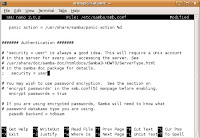
uncomment the security line, and make it look like this:
security = SHARE
I set 'SHARE' because, I want to every one can logon.(simple sharing)
restart samba by following this command
sudo /etc/init.d/samba restart
Testing share folder.
System -> Administration -> Shared Folders
enter your password.
select add button and choose path that you want to share folder and set
Share through : Windows network (SMB)
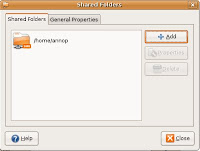
look like this picture.
now everyone on window can get file from ubuntu.
I will show how to install your computer to samba server on ubunutu 7.04.
open the terminal and following this command.
sudo apt-get install samba smbfs
samba will installed your on computer. next open the config file in.
sudo nano /etc/samba/smb.conf
in this file you can set workgroup too.next

uncomment the security line, and make it look like this:
security = SHARE
I set 'SHARE' because, I want to every one can logon.(simple sharing)
restart samba by following this command
sudo /etc/init.d/samba restart
Testing share folder.
System -> Administration -> Shared Folders
enter your password.
select add button and choose path that you want to share folder and set
Share through : Windows network (SMB)

look like this picture.
now everyone on window can get file from ubuntu.
Saturday, November 24, 2007
Email Icon Generator
I have been seen website that i think it good because I can use to my signature all website that i had member. It can generate email icon and have many provider you can select. eg, hotmail, msn, yahoo, google. You can save it or get link from that site and use everywhere.
This my email icon:


If you want email icon you can get here:
http://services.nexodyne.com/email/index.php
This my email icon:


If you want email icon you can get here:
http://services.nexodyne.com/email/index.php
Friday, November 23, 2007
Install java on ubuntu
Download java(SDK) from: http://java.coe.psu.ac.th
Set file permission by
chmod +x filename
install file by following command
./filename
You can select where directory file will be install.
To see a list of the java versions that you have installed, you can use the following command.
java -version
To switch to different version that you want by following command
update-java-alternatives -s
Version desired you get from list above that you see.
Select version that you want.
When you finished check version again.
Set file permission by
chmod +x filename
install file by following command
./filename
You can select where directory file will be install.
To see a list of the java versions that you have installed, you can use the following command.
java -version
To switch to different version that you want by following command
update-java-alternatives -s
Version desired you get from list above that you see.
Select version that you want.
When you finished check version again.
Monday, September 17, 2007
Top-secret Photoshop splash screen

If you want to see the secret Photoshop CS2 beta startup screen just hold the Control key and choose About
It will show you the splash screen, displaying CS2's secret pre-release code name.
Tuesday, September 4, 2007
.NET simple mail application
.NET framework mail application
----------------------------------------
MailMessage mail = new MailMessage();
mail.From = new MailAddress("xxxFrom@gmail.com", "XXX From");
mail.To.Add(new MailAddress("xxxTo", "xxx TO"));
// You can add BCC or CC here
mail.CC.Add(new MailAddress("zzz", "zzz"));
mail.Subject = "[.NET] Mail simple program";
mail.Body = "It's a mail.";
SmtpClient client = new SmtpClient();
// add username and pass
client.Credentials = new NetworkCredential("xxxFrom@gmail.com", "passxxxxxxxx");
client.Port = 587;
client.Host = "smtp.gmail.com";
client.EnableSsl = true;
client.Send(mail);
----------------------------
Try this.
----------------------------------------
MailMessage mail = new MailMessage();
mail.From = new MailAddress("xxxFrom@gmail.com", "XXX From");
mail.To.Add(new MailAddress("xxxTo", "xxx TO"));
// You can add BCC or CC here
mail.CC.Add(new MailAddress("zzz", "zzz"));
mail.Subject = "[.NET] Mail simple program";
mail.Body = "It's a mail.";
SmtpClient client = new SmtpClient();
// add username and pass
client.Credentials = new NetworkCredential("xxxFrom@gmail.com", "passxxxxxxxx");
client.Port = 587;
client.Host = "smtp.gmail.com";
client.EnableSsl = true;
client.Send(mail);
----------------------------
Try this.
Monday, September 3, 2007
Drive Traffic to Your Blog
There are many factors that make blogs much better than normal WebPages including the speed at which blogs are indexed, ability to submit to blog directories & normal directories, pings and track backs. All these little things can help drive more traffic to blogs. Here are 15 popular techniques you can use:
1.) Create at least four keyword posts per day. Most of the top blogs such as Boing Boing, Daily Kos, and Instapundit (with literally tens of thousands of visitors per day) publish an average of 30 small 100-150 word posts per day according to "Secrets of the A-list Bloggers: Lots of Short Posts" by TNL.net
2.) Submit to My Yahoo! When you submit your own RSS to My Yahoo it is indexed by Yahoo.
3.) Submit to Google's Reader. When you submit your own blog RSS to Google's Reader the Google Blog Search will index your site.
4.) Add a relevant link directory to your blog and trade links like a demon possessed! Although it may take more time than simply submitting to a search engine one time, this method is perhaps the best way to drive traffic to your site. Use software such as Zeus to speed up the link trading process.
5.) Use ping sites like ping-o-matic. Ping your site every time you add a new post.
6.) Submit your blog to traditional search engines such as AltaVista, and MSN.
7.) Submit your blog to traditional directories such as DMOZ. Directories (particularly DMOZ) increase relevance with Google. DMOZ is very picky, but what do you have to lose by trying?
8.) Submit to as many RSS Directories and Search Engines as possible. This is a simple but repetitive process that can be done with software such as RSS SUBMIT.
9.) Comment on other blogs. Do not just leave short, lazy comments like "I agree." Leave well thought out replies that will force readers to wonder "who wrote this?"
10.) Use track backs. If there is a blog that you refer to or quote and it is highly relevant to your subject, leave a track back. It increases your link popularity and may even score a few interested readers from the linked site.
11.) Go offline. Use newspaper ads, public bulletin boards, business cards, even stickers to let as many people as possible know your blog exists.
12.) Ad a link to your blog in your e-mail signature block.
13.) Use Groups (Usenet). Find a relevant group on Google groups, Yahoo groups, MSN groups or any of the thousands of other FREE group services and find like minded people and talk with them. Make sure your use your blog URL like it is your name.
14.) Use Forums. Forums are one of the best places to go for advice. Go to forums and find problems to solve. Make sure you leave your blog name, but be tactful about it; some forums get annoyed with those who selfishly drop a few links to their own site and leave.
15.) Tag your website. Tagging is a new idea that has erupted across the web. Sites like Del.icio.us, Technorati and many others have a social feature that allows you to place your article under keywords or "tags" that everyone interested in that tag can see.
Although these are some of the most popular ways to drive traffic to your blog, do not limit your self to tips and lists. Use your imagination and you will come up with thousands of ways to drive traffic to your blog!
Visit http://workathome.enlared.biz to find a complete selection of free ebooks, tools, utilities, articles and home bussiness ideas.
1.) Create at least four keyword posts per day. Most of the top blogs such as Boing Boing, Daily Kos, and Instapundit (with literally tens of thousands of visitors per day) publish an average of 30 small 100-150 word posts per day according to "Secrets of the A-list Bloggers: Lots of Short Posts" by TNL.net
2.) Submit to My Yahoo! When you submit your own RSS to My Yahoo it is indexed by Yahoo.
3.) Submit to Google's Reader. When you submit your own blog RSS to Google's Reader the Google Blog Search will index your site.
4.) Add a relevant link directory to your blog and trade links like a demon possessed! Although it may take more time than simply submitting to a search engine one time, this method is perhaps the best way to drive traffic to your site. Use software such as Zeus to speed up the link trading process.
5.) Use ping sites like ping-o-matic. Ping your site every time you add a new post.
6.) Submit your blog to traditional search engines such as AltaVista, and MSN.
7.) Submit your blog to traditional directories such as DMOZ. Directories (particularly DMOZ) increase relevance with Google. DMOZ is very picky, but what do you have to lose by trying?
8.) Submit to as many RSS Directories and Search Engines as possible. This is a simple but repetitive process that can be done with software such as RSS SUBMIT.
9.) Comment on other blogs. Do not just leave short, lazy comments like "I agree." Leave well thought out replies that will force readers to wonder "who wrote this?"
10.) Use track backs. If there is a blog that you refer to or quote and it is highly relevant to your subject, leave a track back. It increases your link popularity and may even score a few interested readers from the linked site.
11.) Go offline. Use newspaper ads, public bulletin boards, business cards, even stickers to let as many people as possible know your blog exists.
12.) Ad a link to your blog in your e-mail signature block.
13.) Use Groups (Usenet). Find a relevant group on Google groups, Yahoo groups, MSN groups or any of the thousands of other FREE group services and find like minded people and talk with them. Make sure your use your blog URL like it is your name.
14.) Use Forums. Forums are one of the best places to go for advice. Go to forums and find problems to solve. Make sure you leave your blog name, but be tactful about it; some forums get annoyed with those who selfishly drop a few links to their own site and leave.
15.) Tag your website. Tagging is a new idea that has erupted across the web. Sites like Del.icio.us, Technorati and many others have a social feature that allows you to place your article under keywords or "tags" that everyone interested in that tag can see.
Although these are some of the most popular ways to drive traffic to your blog, do not limit your self to tips and lists. Use your imagination and you will come up with thousands of ways to drive traffic to your blog!
Visit http://workathome.enlared.biz to find a complete selection of free ebooks, tools, utilities, articles and home bussiness ideas.
SEO and Blogging
SEO and blogging can be used together to provide you with an almost unbeatable combination, not only for free advertising, but also to make money.
If the objective of your website or your blog is to provide information, or to operate a website on a non profit-making basis, then both search engine optimization and blogging can work together to improve your current traffic level. If your aim is to make money, either for a bit extra to pay the credit cards each month or as your main or sole means of income, you can use a blog and a properly designed website to improve your traffic flow.
So let's cut to the chase as they say, or hang out the baby and see what drips off, or put out the mat and see what it collects from your feet! How can people be serious about these things at so-called serious business meetings? Beats me! Anyhow, lets open the refrigerator and see what's fresh.
SEO - THE QUICK WAY
First SEO. If your website looks good to the search engines then it will have a good chance of being listed. But let's be realistic: the best is Google, so keep Google sweet and the rest will follow. Design each web page, including your home page, round one keyword or keyphrase. Don't try to optimize any page for more that one keyword or you will fail.
Forget the Meta tags. Put them in if you have the time, but not for the quick way. Put your page title in.... tags and include your page keyword in it. It must not be only your keyword, but that should be part of it. For example, if your keyword is 'Using Blogs' the your title could be: Using Blogs and SEO to make Money'
That's a good sized title, and a good way to use the keyword 'using blogs' for your page. Now, the first heading or headline should be 'Using Blogs' Just that, and put it in H1 html tags. Don't worry about the purity of your html because Google doesn't give a toss as long it can understand your H1 tags and Title.
If you have any graphics, even a payment graphic such as the one that Clickbank provides, add an alt relation to it: < img= . . . alt="using blogs Image 1">. This reinforces the information to the spider that the theme of the page is 'using blogs'.
Use your keyword in the first 100 characters of your body html, for example, title:
"Using Blogs"
"Using blogs in combination with good webpage SEO has been proved time and again an extremely effective technique in the science of making money. The secret is to understand the needs of bloggers and of search engine users, and how to combine the two into a single money-generating machine that you can design to work on autopilot while you work on your next money-spinning project."
Look at that again: I have used the keyword in the heading, and all the words in the Page title in the first 100 characters. The keyword is used immediately and the rest of the title also in the first sentence. If you also use the keyword once more in the last paragraph the crawlers will love it and you will have a head start on your competitors.
You could then continue on the theme of blogs, and have another section on the same page with the heading: "Using Blogs and SEO" contained within H2 tags that expands on the theme of blogs and SEO while introducing the concept of using blogs and web pages together to their mutual benefit.
INTERNAL LINKING STRATEGY
That is all you need do on each page, but do it on EVERY page that should be optimized for every different keyword that you have identified as being worth while to use on your website. However, there is one more thing you must do and that is to design your internal linking strategy to your best advantage. It should allow your visitors to easily navigate between pages, and also reach pages that they want to see such as your Privacy Policy and Contact details.
However, it is more that that. It is also a means of leading the search engine spider to dance your dance, and not Google's Dance, as it were. Lead the spider to the pages you want it to see when you want it to see them, and bar it from seeing those it doesn't have to see. You can allow humans to see pages that you have barred from spiders. Simply place a big 'Humans Only' sign above each door, and spider cannot get in.
BLOGGING
Your blogs should be updated to show every change you make to your website, but be optimized for different keywords to those your website is using. I have tested blogs with and without the same keywords and my web pages, and they generally work best when not competing.
For some reason that I cannot apply logic to, I get better results from my website when linked to blogs that have different keywords, that the same. However, that's unimportant. What is important is that, unlike article directories, the articles in your blogs can advertise as many websites or products as you want. That is one of their major benefits when used in conjunction with websites. You can use one to advertise the other without fear of losing anything because they both belong to you. You cannot have a net loss with links between two of your own sites.
If you ping your blog to every web2 site that you are registered with then you can get a lot more traffic than if you had only used SEO for your free traffic. Blogs, too, are free, so use them.
CONCLUSION
If you use easy SEO and worry only about the elements I have mentioned above, you will have a great chance of your webpage home page being listed high on Google and the other search engines. If you use your blogs to advertise your site, not only to other bloggers but also to the many social bookmarking and Web2 sites that you can join, then you can achieve success in much less time than you might have imagined.
If you are not willing to put the blogging and Web2 work in, then you will not be so successful, and do not deserve to be
credit by :http://www.goarticles.com/cgi-bin/showa.cgi?C=600572
If the objective of your website or your blog is to provide information, or to operate a website on a non profit-making basis, then both search engine optimization and blogging can work together to improve your current traffic level. If your aim is to make money, either for a bit extra to pay the credit cards each month or as your main or sole means of income, you can use a blog and a properly designed website to improve your traffic flow.
So let's cut to the chase as they say, or hang out the baby and see what drips off, or put out the mat and see what it collects from your feet! How can people be serious about these things at so-called serious business meetings? Beats me! Anyhow, lets open the refrigerator and see what's fresh.
SEO - THE QUICK WAY
First SEO. If your website looks good to the search engines then it will have a good chance of being listed. But let's be realistic: the best is Google, so keep Google sweet and the rest will follow. Design each web page, including your home page, round one keyword or keyphrase. Don't try to optimize any page for more that one keyword or you will fail.
Forget the Meta tags. Put them in if you have the time, but not for the quick way. Put your page title in
That's a good sized title, and a good way to use the keyword 'using blogs' for your page. Now, the first heading or headline should be 'Using Blogs' Just that, and put it in H1 html tags. Don't worry about the purity of your html because Google doesn't give a toss as long it can understand your H1 tags and Title.
If you have any graphics, even a payment graphic such as the one that Clickbank provides, add an alt relation to it: < img= . . . alt="using blogs Image 1">. This reinforces the information to the spider that the theme of the page is 'using blogs'.
Use your keyword in the first 100 characters of your body html, for example, title:
"Using Blogs"
"Using blogs in combination with good webpage SEO has been proved time and again an extremely effective technique in the science of making money. The secret is to understand the needs of bloggers and of search engine users, and how to combine the two into a single money-generating machine that you can design to work on autopilot while you work on your next money-spinning project."
Look at that again: I have used the keyword in the heading, and all the words in the Page title in the first 100 characters. The keyword is used immediately and the rest of the title also in the first sentence. If you also use the keyword once more in the last paragraph the crawlers will love it and you will have a head start on your competitors.
You could then continue on the theme of blogs, and have another section on the same page with the heading: "Using Blogs and SEO" contained within H2 tags that expands on the theme of blogs and SEO while introducing the concept of using blogs and web pages together to their mutual benefit.
INTERNAL LINKING STRATEGY
That is all you need do on each page, but do it on EVERY page that should be optimized for every different keyword that you have identified as being worth while to use on your website. However, there is one more thing you must do and that is to design your internal linking strategy to your best advantage. It should allow your visitors to easily navigate between pages, and also reach pages that they want to see such as your Privacy Policy and Contact details.
However, it is more that that. It is also a means of leading the search engine spider to dance your dance, and not Google's Dance, as it were. Lead the spider to the pages you want it to see when you want it to see them, and bar it from seeing those it doesn't have to see. You can allow humans to see pages that you have barred from spiders. Simply place a big 'Humans Only' sign above each door, and spider cannot get in.
BLOGGING
Your blogs should be updated to show every change you make to your website, but be optimized for different keywords to those your website is using. I have tested blogs with and without the same keywords and my web pages, and they generally work best when not competing.
For some reason that I cannot apply logic to, I get better results from my website when linked to blogs that have different keywords, that the same. However, that's unimportant. What is important is that, unlike article directories, the articles in your blogs can advertise as many websites or products as you want. That is one of their major benefits when used in conjunction with websites. You can use one to advertise the other without fear of losing anything because they both belong to you. You cannot have a net loss with links between two of your own sites.
If you ping your blog to every web2 site that you are registered with then you can get a lot more traffic than if you had only used SEO for your free traffic. Blogs, too, are free, so use them.
CONCLUSION
If you use easy SEO and worry only about the elements I have mentioned above, you will have a great chance of your webpage home page being listed high on Google and the other search engines. If you use your blogs to advertise your site, not only to other bloggers but also to the many social bookmarking and Web2 sites that you can join, then you can achieve success in much less time than you might have imagined.
If you are not willing to put the blogging and Web2 work in, then you will not be so successful, and do not deserve to be
credit by :http://www.goarticles.com/cgi-bin/showa.cgi?C=600572
Subscribe to:
Posts (Atom)